Paypal has not been verified because there may be no cc (creditcard) or hesitate to verify with your cc, now you can verify your paypal with paypal menghhubungi and verification of your data via email
The following verification steps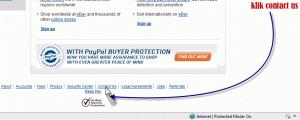

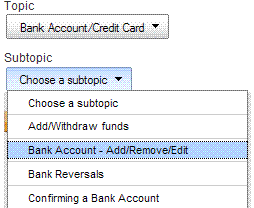
then write a message that says the question "Can I verify my paypal account without a cc" of course with the English language, eg
Can Iget verified my Paypal acount without a credit card
submit and wait for an email reply to your email account in paypal. The following message I get from webform@apac.paypal.com
Hello your name
I am May from the PayPal Customer Caring Team. Thank you for Contacting
PayPal verification regarding your PayPal account.
I Understand you wonder how to verify your account without a credit
card. Please follow the instruction below:
If you have a Personal account, you'll need to upgrade to a Premier
account before you verify your PayPal account.
Here's how to upgrade your account and manually verify your PayPal
account (For Personal Account xxx xxx users only):
1. Go to www.paypal.com.sg and log in to your account.
2. Click "Upgrade" under your name and then click "Upgrade Now."
3. Select Premier account and click "Continue."
After you upgrade your account, please send us a copy of these documents
as a GIF or JPG:
• A copy of your photo identification (Identification Card, Driving
Licence, or Passport).
• A copy of your bank account statement or bank book That shows your
name and bank account number.
Please Make sure That one of the documents you submit displays an
That address matches the address on your PayPal account.
If the addresses do not match, there are Two Ways you can help us
complete this process:
Option 1:
Submit a third document with an address That matches the one registered
on your PayPal account. This can be a copy of a utility bill, bank or
credit card statement, or any other official document in your name That
is dated within the last 6 months.
Option 2:
Change the address on your PayPal account to match with one of the
documents you submitted.
1. Log in to your PayPal account.
2. Click "Profile" near the top of the page.
3. Click "Street Address" under Account Information.
4. Click "Add."
5. Type the new street addresses in the address boxes provided.
6. Click "Save."
Email your documents to manualverify@paypal.com. Please use the email
address registered on your PayPal account. After We review the
documents, we'll contact you within 1-2 business days.
Further if you need any assistance, please feel free to contact us by
email or by phone. Thanks again for choosing PayPal.
Sincerely,
May
Copyright © 1999-2011 PayPal. All rights reserved.
Consumer advisory: PayPal Pte Ltd, the Holder of the PayPal ™ payment
service stored value facility, does not require the approval of the
Monetary Authority of Singapore. Consumers (users) are advised to read
the terms and conditions carefully.
dijawabkan well as paypal
we must upgrade our account from the personal to the premiere, and then after upgrading to send an email reply containing the results of the scan ID cards, driver's license, and the front page of your bank account book. and make sure your bank address same data between the on ID cards, driver's license and the account books, as well as in your paypal account.
This example of a written email response, of course with the included scans ID cards, driver's license, and the first page of your account.
Reffering to the request, here i submit my documents (Identification Card, Driving Licence, and Bank Book)
The following verification steps


select the topic and sub topic add a bank acount, enter your bank data

then write a message that says the question "Can I verify my paypal account without a cc" of course with the English language, eg
Can Iget verified my Paypal acount without a credit card
submit and wait for an email reply to your email account in paypal. The following message I get from webform@apac.paypal.com
Hello your name
I am May from the PayPal Customer Caring Team. Thank you for Contacting
PayPal verification regarding your PayPal account.
I Understand you wonder how to verify your account without a credit
card. Please follow the instruction below:
If you have a Personal account, you'll need to upgrade to a Premier
account before you verify your PayPal account.
Here's how to upgrade your account and manually verify your PayPal
account (For Personal Account xxx xxx users only):
1. Go to www.paypal.com.sg and log in to your account.
2. Click "Upgrade" under your name and then click "Upgrade Now."
3. Select Premier account and click "Continue."
After you upgrade your account, please send us a copy of these documents
as a GIF or JPG:
• A copy of your photo identification (Identification Card, Driving
Licence, or Passport).
• A copy of your bank account statement or bank book That shows your
name and bank account number.
Please Make sure That one of the documents you submit displays an
That address matches the address on your PayPal account.
If the addresses do not match, there are Two Ways you can help us
complete this process:
Option 1:
Submit a third document with an address That matches the one registered
on your PayPal account. This can be a copy of a utility bill, bank or
credit card statement, or any other official document in your name That
is dated within the last 6 months.
Option 2:
Change the address on your PayPal account to match with one of the
documents you submitted.
1. Log in to your PayPal account.
2. Click "Profile" near the top of the page.
3. Click "Street Address" under Account Information.
4. Click "Add."
5. Type the new street addresses in the address boxes provided.
6. Click "Save."
Email your documents to manualverify@paypal.com. Please use the email
address registered on your PayPal account. After We review the
documents, we'll contact you within 1-2 business days.
Further if you need any assistance, please feel free to contact us by
email or by phone. Thanks again for choosing PayPal.
Sincerely,
May
Copyright © 1999-2011 PayPal. All rights reserved.
Consumer advisory: PayPal Pte Ltd, the Holder of the PayPal ™ payment
service stored value facility, does not require the approval of the
Monetary Authority of Singapore. Consumers (users) are advised to read
the terms and conditions carefully.
dijawabkan well as paypal
we must upgrade our account from the personal to the premiere, and then after upgrading to send an email reply containing the results of the scan ID cards, driver's license, and the front page of your bank account book. and make sure your bank address same data between the on ID cards, driver's license and the account books, as well as in your paypal account.
This example of a written email response, of course with the included scans ID cards, driver's license, and the first page of your account.
Reffering to the request, here i submit my documents (Identification Card, Driving Licence, and Bank Book)
after you send emails with attachments scanned ID cards, driver's license, and the front page of your bank account book
 and paypal will promptly reply to your email.
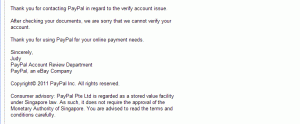 Good try, good luck

.

berhasildan hopefully it might not work
l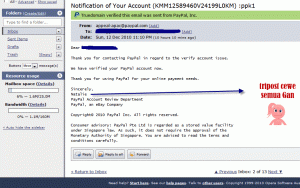


thank you.